-
- KeepassXC as Key Ring Manager for Minimal DEs & WMs
-
- _ __ __ __ ___
- | |/ / ___ ___ _ __ __ _ ___ ___ \ \/ / / __|
- | ' < / -_) / -_) | '_ \ / _` | (_-< (_-< > < | (__
- |_|\_\ \___| \___| | .__/ \__,_| /__/ /__/ /_/\_\ \___|
- |_|
-
-
- __ _ ___
- / _` | (_-<
- \__,_| /__/
-
-
- _ __
- | |/ / ___ _ _
- | ' < / -_) | || |
- |_|\_\ \___| \_, |
- |__/
-
- ___ _
- | _ \ (_) _ _ __ _
- | / | | | ' \ / _` |
- |_|_\ |_| |_||_| \__, |
- |___/
-
- __ __
- | \/ | __ _ _ _ __ _ __ _ ___ _ _
- | |\/| | / _` | | ' \ / _` | / _` | / -_) | '_|
- |_| |_| \__,_| |_||_| \__,_| \__, | \___| |_|
- |___/
-
- __
- / _| ___ _ _
- | _| / _ \ | '_|
- |_| \___/ |_|
-
-
- __ __ _ _ _
- | \/ | (_) _ _ (_) _ __ __ _ | |
- | |\/| | | | | ' \ | | | ' \ / _` | | |
- |_| |_| |_| |_||_| |_| |_|_|_| \__,_| |_|
-
-
- ___ ___
- | \ | __| ___
- | |) | | _| (_-<
- |___/ |___| /__/
-
-
- __
- / _|___
- > _|_ _|
- \_____|
-
-
- __ __ __ __
- \ \ / / | \/ | ___
- \ \/\/ / | |\/| | (_-<
- \_/\_/ |_| |_| /__/
-
-
- ╔─*──*──*──*──*──*──*──*──*──*──*──*──*──*──*──*──*──*──*──╗
- ║1 .................................................. 1║
- ║2* .................................................. *2║
- ║3 .................................................. 3║
- ║1 ................Posted: 2025-10-15................ 1║
- ║2* Tags: sysadmin linux security debian window_maker *2║
- ║3 .................................................. 3║
- ║1 .................................................. 1║
- ╚──────────────────────────────────────────────────────────╝
-
- Use KeePassXC as your Key Ring Manager in non-GNOME/KDE big DE setups. For
- example, I use it with Window Maker (see my post)[1].
-
- This is how to use KeePassXC as:
-
- - your SSH key manager
- - your Secret Service (org.freedesktop.secrets)
- - without GNOME, KDE, or keyring daemons
-
- The goal: One stable ssh-agent socket. Everything talks to it. KeePassXC loads
- keys into it. The socket to survive reboots.
-
- No popups. No race conditions. No broken SSH.
-
- ## 1. Create a systemd user ssh-agent
-
- Edit `~/.config/systemd/user/ssh-agent.service`:
-
- ```
- [Unit]
- Description=OpenSSH SSH agent
-
- [Service]
- Type=simple
- # Clean up a stale socket after crashes/reboots
- ExecStartPre=/usr/bin/rm -f %t/ssh-agent.socket
- # Bind a fixed, predictable path in the user runtime dir (%t == /run/user/$UID)
- ExecStart=/usr/bin/ssh-agent -D -a %t/ssh-agent.socket
-
- [Install]
- WantedBy=default.target
- ```
-
- Enable it:
-
- ```
-
- systemctl --user daemon-reload
- systemctl --user enable --now ssh-agent.service
-
- ```
-
- Your agent now lives at:
-
- ```
- /run/user/<UID>/ssh-agent.socket
- ```
-
- NOTE: `<UID>` is probably `1000`.
-
- ## 2. Export SSH_AUTH_SOCK everywhere
-
- Create: ~/.config/environment.d/10-ssh-agent.conf
-
- ```
-
- SSH_AUTH_SOCK=${XDG_RUNTIME_DIR}/ssh-agent.socket
-
- ```
-
- Also force it in zsh (important for minimal WMs): Put this at the very top of
- ~/.zshrc
-
- ```
-
- export SSH_AUTH_SOCK="${XDG_RUNTIME_DIR:-/run/user/$(id -u)}/ssh-agent.socket"
-
- ```
-
- This prevents old or broken agents from hijacking your shell.
-
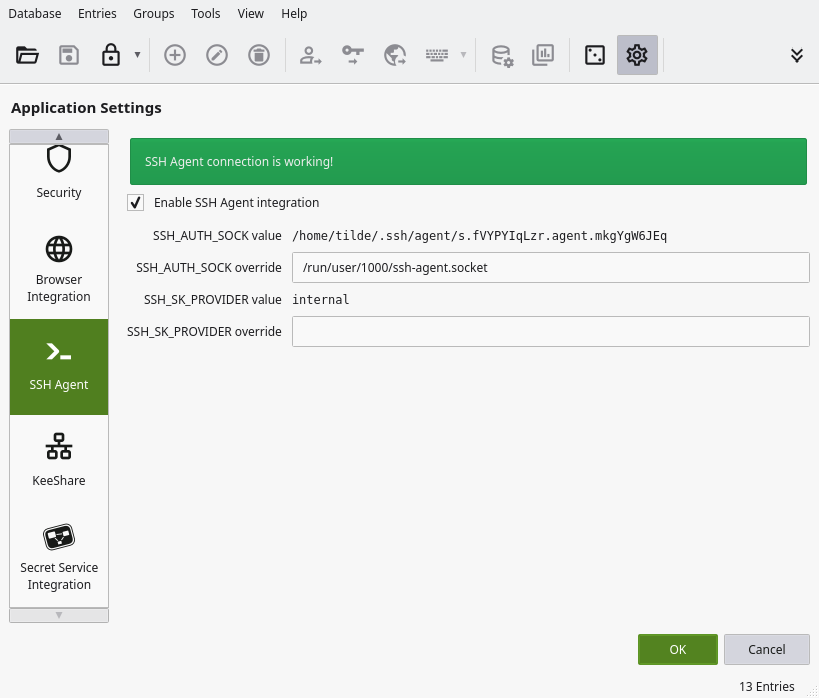
- ## 3. Tell KeePassXC to use that socket
-
- KeepassXC's SSH Agent Settings
-
- KeePassXC -> Settings -> SSH Agent
-
- Enable:
-
- - SSH Agent integration
-
- Set:
-
- - SSH_AUTH_SOCK override: /run/user/1000/ssh-agent.socket (use your UID)
-
- KeePassXC is now a client of the real agent.
-
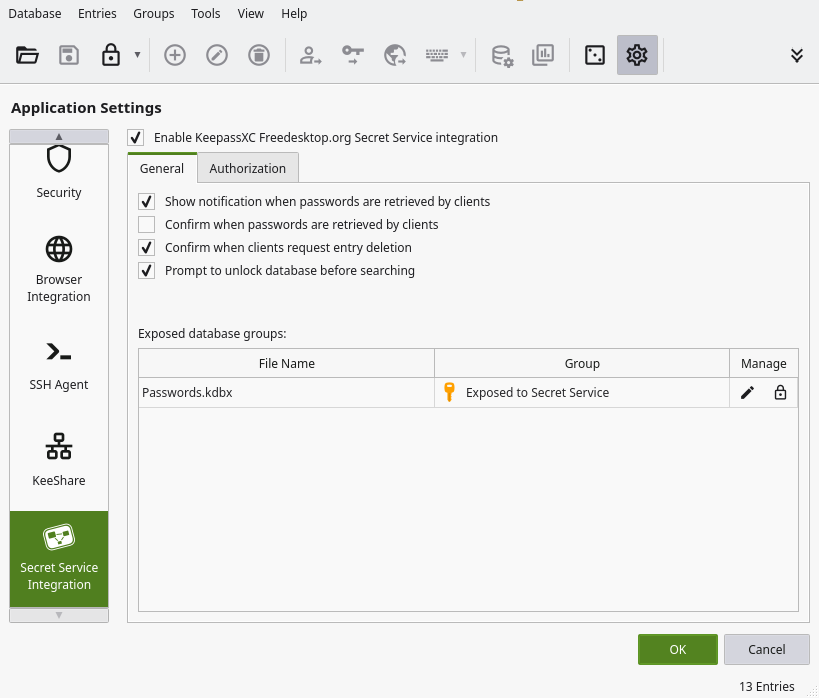
- ## 4. Enable Secret Service (Linux keyring)
-
- KeepassXC's Secret Service Settings
-
- KeePassXC -> Settings: Enable "Freedesktop.org Secret Service integration"
-
- Open your database: Database Settings -> Secret Service Integration Choose a
- group to expose.
-
- KeePassXC now replaces:
-
- - gnome-keyring
- - kwallet
- - gcr
-
- ## 5. Verify
-
- You'll likely want to logout/login.
-
- ```
- echo $SSH_AUTH_SOCK
- ssh-add -l
-
- ```
-
- You should see:
-
- ```
- /run/user/UID/ssh-agent.socket
- ```
-
- ...and your keys listed.
-
- Don't forget to check the box to add a key to the keyring for the respective ssh
- key entries in KeepassXC!
-
- If you have any troubles, it may just be that another keyring manager is being
- annoying. I found Gnoe's keyring manager was such a hinderence I uninstalled it.
-
- ## Caveats
-
- You might still get prompted by `gpg-agent`, this is a separate subsystem.
-
- ## Footnotes
-
- [1]: Window Maker (see my post): /phlog/window-maker.gopher.txt