-
- Lagrange & ASCII-art-heavy gopherholes
-
- _
- | | __ _ __ _ _ _ __ _ _ _ __ _ ___
- | |__ / _` | / _` | | '_| / _` | | ' \ / _` | / -_)
- |____| \__,_| \__, | |_| \__,_| |_||_| \__, | \___|
- |___/ |___/
-
- __
- / _|___
- > _|_ _|
- \_____|
-
-
- _ ___ ___ ___ ___ _ _
- /_\ / __| / __| |_ _| |_ _| ___ __ _ _ _ | |_ ___ | |_ ___ __ _ __ __ _ _
- / _ \ \__ \ | (__ | | | | |___| / _` | | '_| | _| |___| | ' \ / -_) / _` | \ V / | || |
- /_/ \_\ |___/ \___| |___| |___| \__,_| |_| \__| |_||_| \___| \__,_| \_/ \_, |
- |__/
-
- _ _ _
- __ _ ___ _ __ | |_ ___ _ _ | |_ ___ | | ___ ___
- / _` | / _ \ | '_ \ | ' \ / -_) | '_| | ' \ / _ \ | | / -_) (_-<
- \__, | \___/ | .__/ |_||_| \___| |_| |_||_| \___/ |_| \___| /__/
- |___/ |_|
-
- ╔─*──*──*──*──*──*──*──*──*──*──*──*──*──*──*──*─╗
- ║1 ........................................ 1║
- ║2* ........................................ *2║
- ║3 ........................................ 3║
- ║1 ...........Posted: 2024-12-30........... 1║
- ║2* .............Tags: gopher .............. *2║
- ║3 ........................................ 3║
- ║1 ........................................ 1║
- ╚────────────────────────────────────────────────╝
-
- Making Lagrange display ASCII-art heavy gopherholes in a (hopefully) nicer way.
-
- You may notice that because Lagrange has some nice and interesting way of
- detecting style and applying styles to even the Gopher Protocol which is
- basically just plaintext, that some gopherholes that really depend on being
- viewed with a consistent, monospaced font may look jacked up.
-
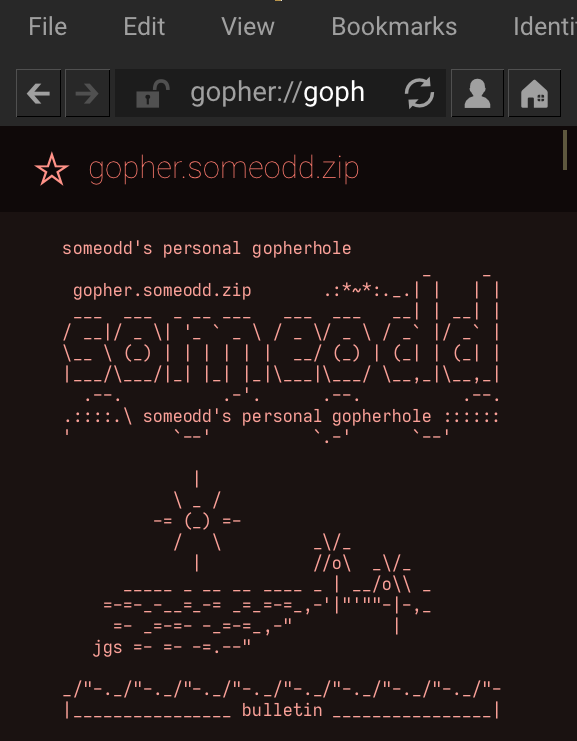
- For example, my gopherhole may look messed up in Lagrange unless you apply these
- tweaks.
-
- Luckily, the creator of Lagrange helped me resolve this issue somewhat. I
- reached out to him on Mastodon. You can see the toots below:
-
- https://fosstodon.org/@someodd/113033758695910014
-
- What an amazing piece of software, which makes the Gopher Protocol so much more
- accessible. It's available on many different operating systems, for your phone,
- desktop, laptop, etc.
-
- https://gmi.skyjake.fi/lagrange/
-
- Here's the solution, which worked for me on both Android and Debian:
-
- * Preferences -> page style > monospace body: enable for "gopher"
- * Disable: content -> autodetect gopher menu styling
- * A bonus I noticed: for monospace font select "Iosevka (compact)"
-
- I noticed there's still some problems with rendering --> to the right arrow and
- markdown bullets into actual bullets.
-
- Also disable word wrapping. This is under "page layout" > wrpa long plaintext
- lines (make sure to disable).
-
- Example of ASCII art in Lagrange:
-
- ASCII art in Lagrange
-